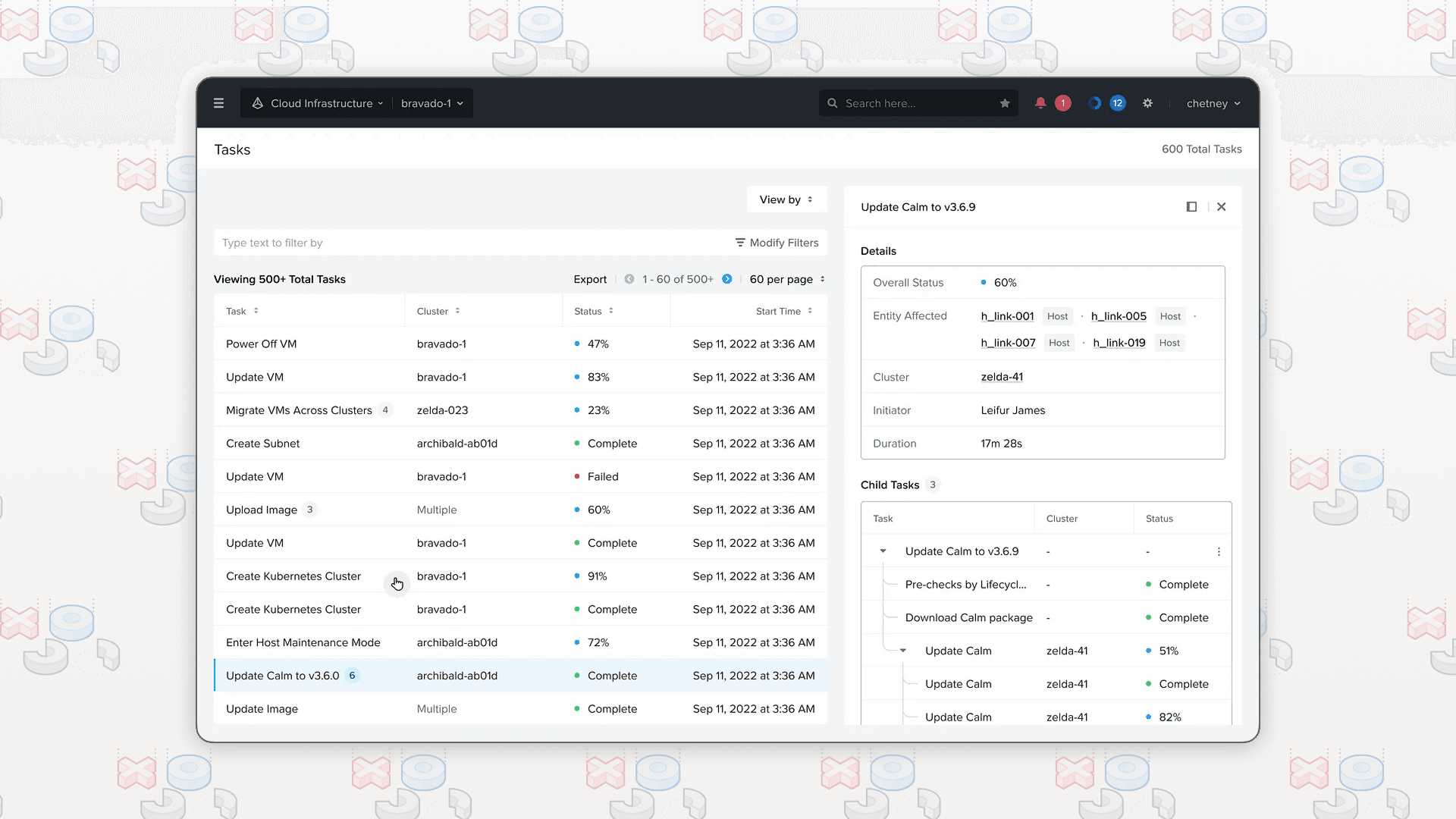
Overview
Every action on Prism Central, from creating a VM to upgrading a cluster, generates a task. The Tasks Screen is where IT teams go to check on those tasks. It sounds simple, but the existing experience was frustrating enough that 52% of surveyed users flagged it for improvement.
I led the UX revamp end-to-end: research, design explorations, prototyping, and user validation. Navdeep Bagga guided me throughout, helping operationalize the research plan, brainstorming during ideation, and providing design critiques that sharpened the work.
Problem
The Tasks Screen is like a TV remote controller. As long as it works, no one notices. Once it breaks, people start cussing. And people were cussing at Tasks.
The screen isn't a destination. It's a pitstop. A cloud admin lands here on a Monday morning to answer one question: what happened to the host on Friday around 10 PM? An engineer checks whether their VM creation task finished so they can deploy. An SRE on a customer call needs to know if an upgrade is stuck.
But the existing screen made even simple questions hard to answer. 321 tasks in a flat table. Subtasks displayed inconsistently. Progress bars that all looked the same. No way to filter by time. No indication of who triggered a task. Finding the task you cared about meant paginating through pages of noise.


Research
Before touching any design tool, we ran four research activities to map the full problem space.
I ran a heuristic evaluation against Nielsen Norman's 10 heuristics and captured 21 usability issues.

The dominant theme was missing or misleading information: task names were vague, progress indicators were unintuitive, and parent-child task relationships were rendered inconsistently. I conducted stakeholder interviews with 2 Cloud Architects, 2 Product Managers, and 2 Serviceability Engineers. I also ran an X-Tribe survey where 52% of 63 respondents said Tasks needs to be improved.
Six insights shaped everything that followed:
- Time-based filtering is essential. Users need to look back at historical tasks, but there's no way to filter by date.
- The Tasks/Audits/Events mental model is broken. Users can't tell the difference between these three activity types.
- Task names are not human-readable. Cryptic system-generated names make troubleshooting harder.
- Search, filter, and sort are inadequate. Limited and inconsistent across the table.
- Parent-child task relationships are confusing. No clear hierarchy or navigation.
- Who created the task is missing. Critical for troubleshooting, completely absent.
Design
The research gave us a clear design question: how do we turn the Tasks Screen from a wall of noise into a tool that answers your question in seconds?
I started by mapping an ideal user flow that captured every design opportunity and assumption. Then I built a storyboard called "Finding the weekend memory snatcher," following Kirk, a cloud admin playing detective on a Monday morning. The storyboard walked through his frustration with the current experience and showed how the redesign could resolve each friction point. It became the artifact that aligned the whole team around the problem.

For the table redesign, I studied vSphere's Task UI (which users and stakeholders kept referencing as a benchmark), tree table patterns for handling hierarchical data, and interaction patterns for detail panels. From there, I explored three layout directions:
- Layout A: Scan-first. Maximized table density with inline status indicators. Fast to scan, but detail access required navigation away from the table.
- Layout B: Detail-first. Persistent side panel showing full task details. Great for troubleshooting, but consumed screen real estate even when you just wanted to scan.
- Layout C: Balanced. Table with on-demand detail panel, filters prominent at the top, and a task explorer tree for navigating parent-child relationships.


Each layout was a direct response to the research insights. Layout C won because it served all three use cases: scanning for status, drilling into failures, and understanding task relationships. The on-demand panel meant the screen stayed clean for monitoring but expanded when you needed to troubleshoot.
Key design decisions tied to research:
- Time-based filters and robust search addressed the biggest filtering gap
- A task explorer tree replaced the inconsistent parent-child rendering with a clear, navigable hierarchy
- Human-readable task names and transparent error messages made troubleshooting self-serve
- Initiator column surfaced who triggered each task
Impact
I ran 7 validation sessions with X-Tribe users. The redesign received an average rating of 6.2 out of 7.
"This is a billion times better!" "It's party time!" "Less jumping around." "The Filters are absolutely amazing!"
After a few more iterations of visual design and interaction polish, the redesign shipped.


Users are happy with it, and the work has had a broader impact: the patterns and decisions from the Tasks revamp are now guiding the design for Alerts, Events, and Audits across Prism Central.
Reflection
This project reinforced something I keep coming back to: the quality of your design is capped by the quality of your research. The heuristic evaluation alone caught 21 issues we would have missed. Layering in stakeholder interviews and survey data meant we walked into explorations with real confidence, not assumptions. By the time we hit validation, the sessions felt like a formality.
The storyboard was the surprise win. It compressed weeks of research into something any stakeholder could internalize in minutes. I've started using empathy artifacts like this in every project since.
